What a packing slip should include
A useful packing slip lists the order reference, sender, recipient, carrier, package count, SKU, item name, ordered quantity, packed quantity, and any short-ship notes.
Free browser tool for ecommerce orders
Create a printable packing slip with ship-from and ship-to details, order references, item quantities, short-ship flags, CSV export, and package notes. Everything stays in your browser.
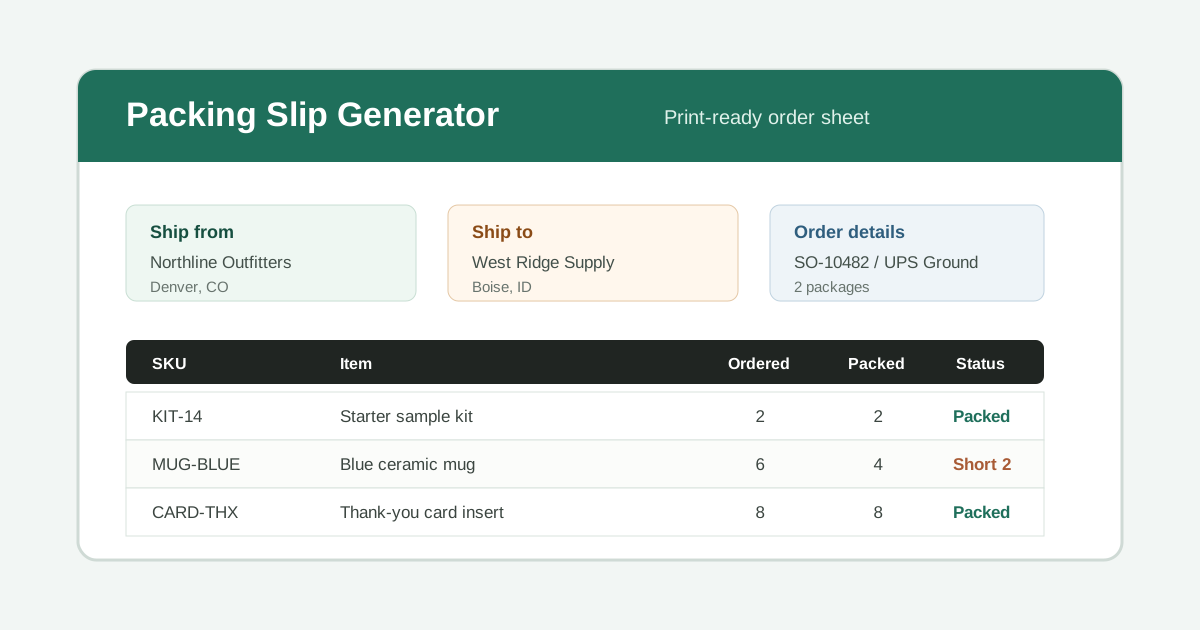
Use the form for a single shipment, a split shipment, or a quick warehouse pick sheet. Load the sample to see realistic data, then export CSV, copy a pick list, or print the final slip.
Reference fields printed at the top of the slip.
Print the sender and recipient clearly for warehouse checks.
Optional carrier fields help the customer match the box to the order.
Short lines are flagged when packed quantity is lower than ordered quantity.
Use notes for packing instructions, split shipments, or customer service context.
A useful packing slip lists the order reference, sender, recipient, carrier, package count, SKU, item name, ordered quantity, packed quantity, and any short-ship notes.
Use this for ecommerce orders, wholesale boxes, sample kits, partial shipments, replacement parts, or internal fulfillment handoffs where a clean item checklist matters.
The generator runs in the browser. It does not upload addresses, order numbers, tracking numbers, or item lists to a server. Clear the form when you finish on a shared device.
Strong packing slip tools keep the form close to the print preview, provide sample data, and make print or PDF actions obvious. This page keeps those actions in the top toolbar.
The CSV export includes SKU, item name, ordered quantity, packed quantity, bin or location, and packed/short/over status so warehouse teams can reuse the line data.
When packed quantity is lower than ordered quantity, the line is flagged before printing. That makes partial shipments clearer for customer support and fulfillment teams.
Use this slip for small ecommerce shops, marketplace orders, wholesale sample shipments, repair parts, split shipments, event kits, or internal pick-and-pack handoffs. Avoid using it as an invoice, payment receipt, customs declaration, or official carrier label.
Yes. The page is free to use and does not require signup. It is designed for one-off slips and small fulfillment workflows.
No. A packing slip usually lists what is inside a shipment. It is not a receipt, tax document, invoice, customs document, or proof of payment.
Use the Print button and choose Save as PDF in your browser print dialog. The print layout hides the form and prints only the slip preview.
The page saves form data only in your current browser local storage so you do not lose work during editing. It does not send that data to this site.
If the packed quantity is lower than the ordered quantity, the line is marked Short with the missing unit count. If packed quantity is higher, it is marked Over so you can double-check it.